Calendar, tasks, notes and shared projects — in one app
ASBooka helps you plan your day, keep track of what needs doing and work together with your family or team. Connect your Yandex, Apple or Google calendar, lay out tasks on a board or an Eisenhower matrix and discuss each shared project in its own chat.
Everything you need to plan — on your own and together
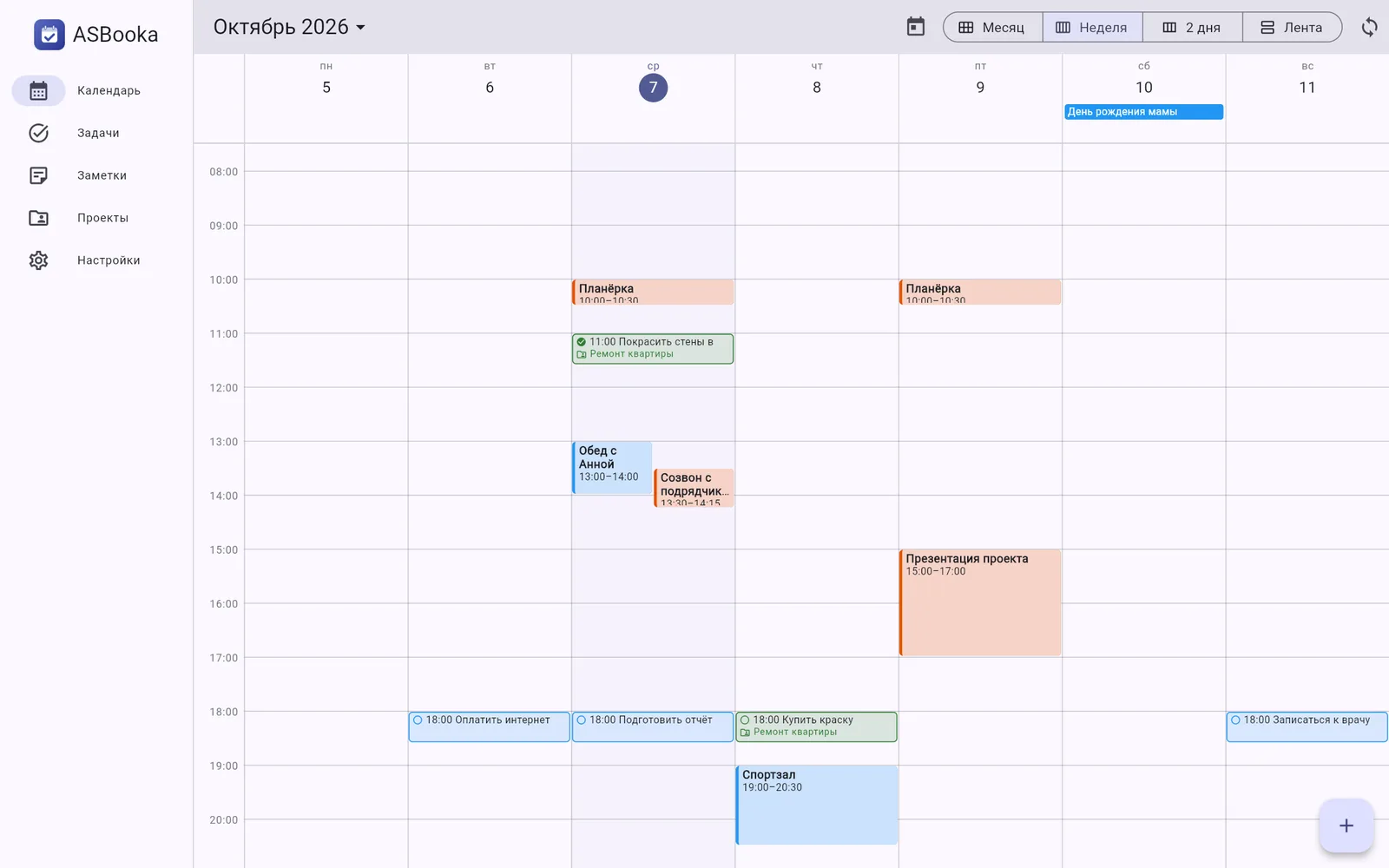
Calendar, tasks, notes and shared projects are connected: a task with a due date shows up in the calendar, a note sits right next to the project's tasks, and everyone discusses it all in the project chat.
A calendar that works with Yandex, Apple and Google calendars
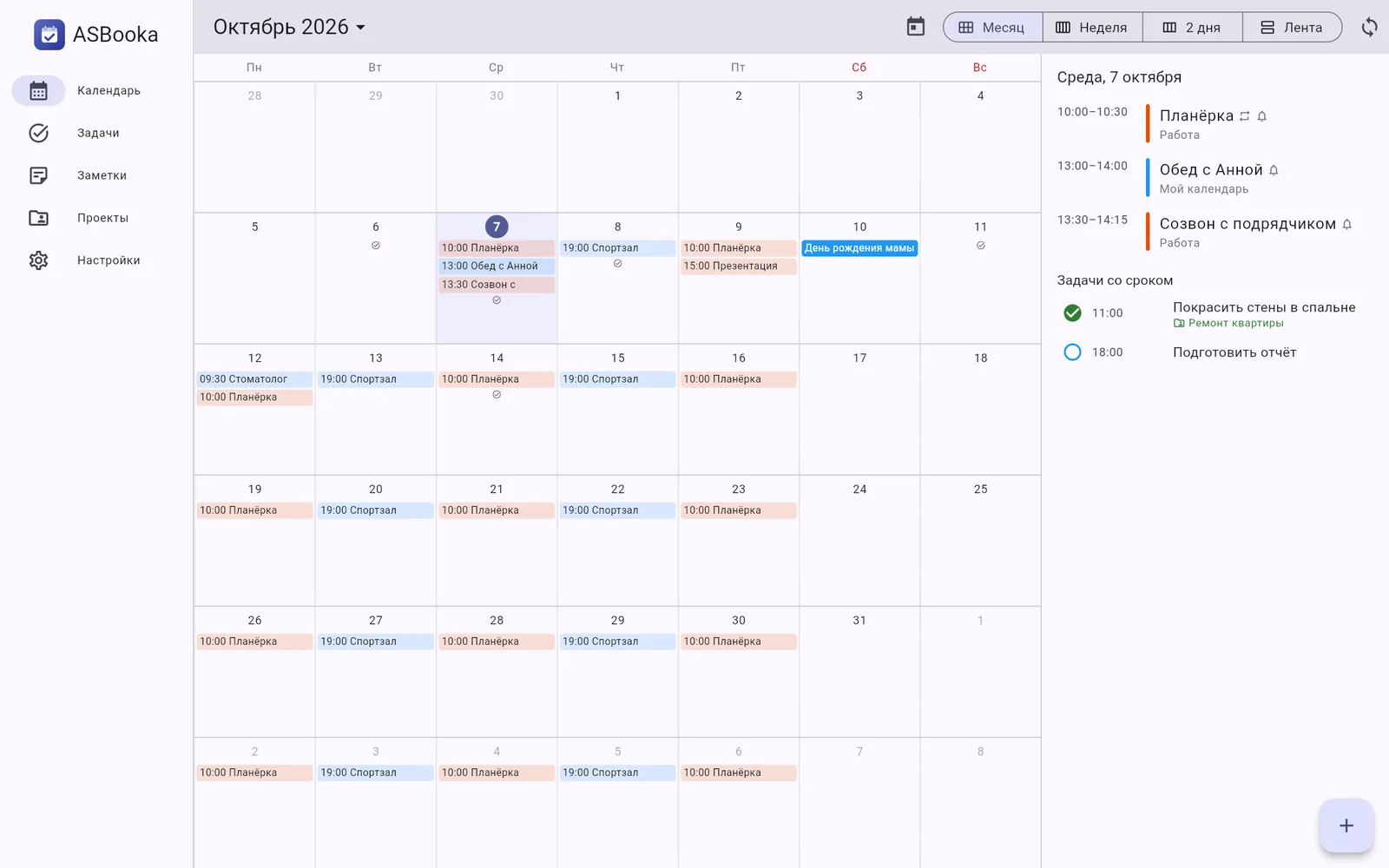
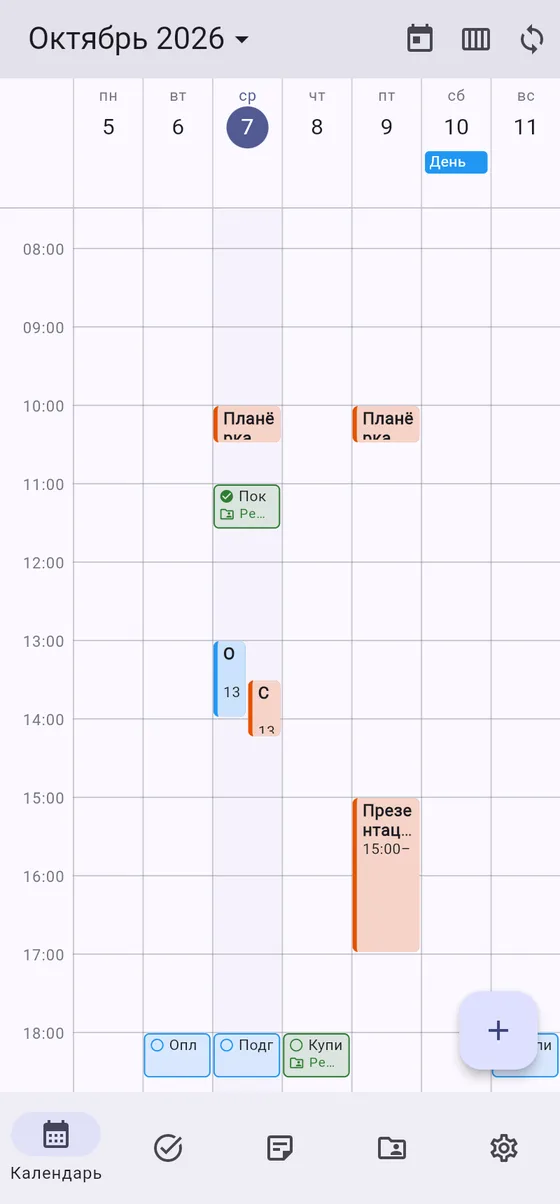
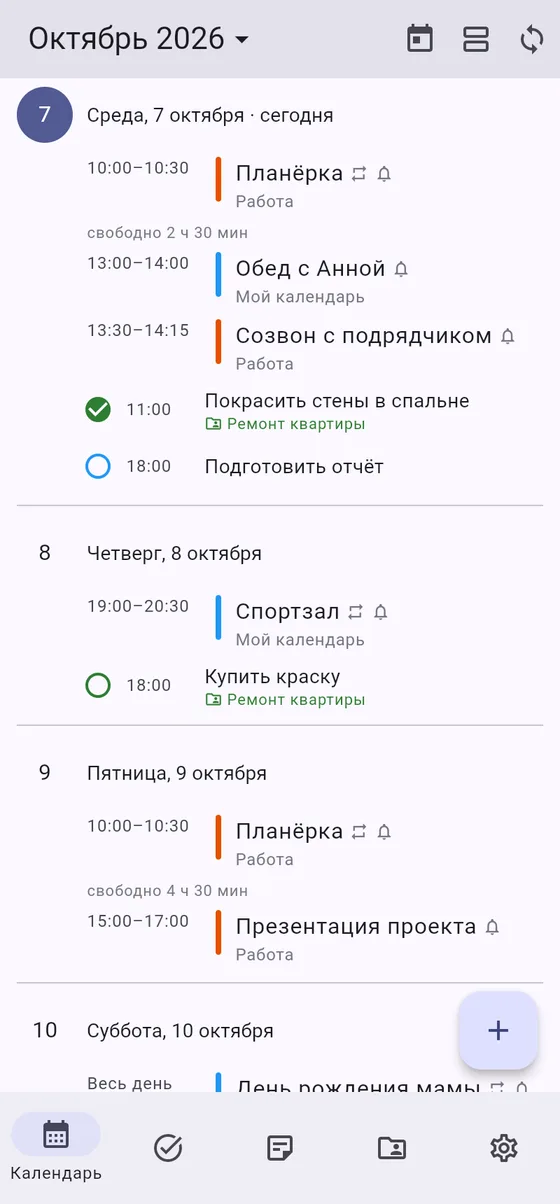
- Month, Feed and Days views (1 to 7 days), with free time shown between meetings.
- Two-way sync with Yandex Calendar, Apple (iCloud) and Google calendars.
- Tasks with a due date appear right in the calendar, tagged with their project.
- Create an event by holding your finger on the right time; drag events around and turn them into tasks.
- Event locations with address suggestions and a point on the map.
- Reminders arrive as push notifications, with a sound of your choice.
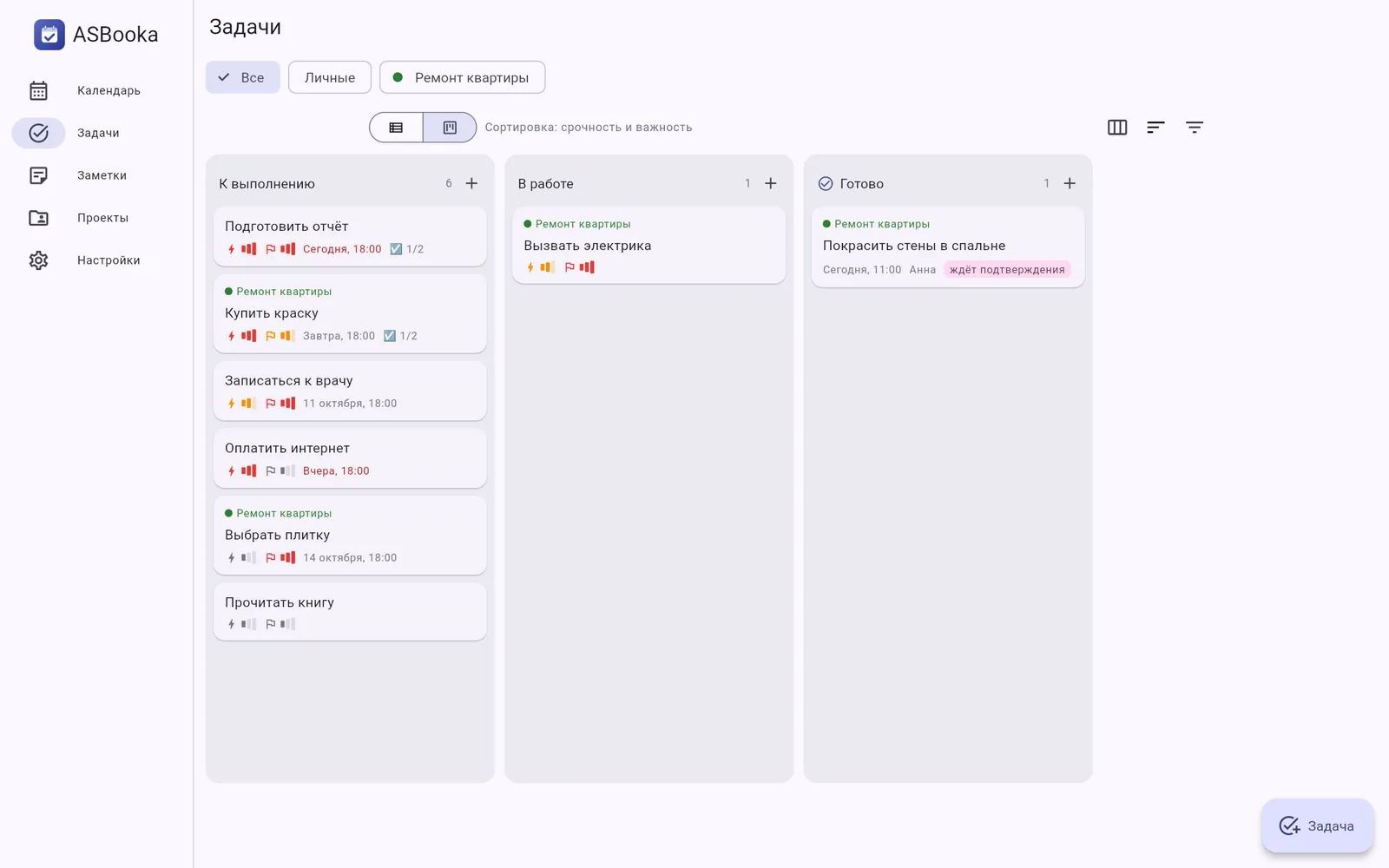
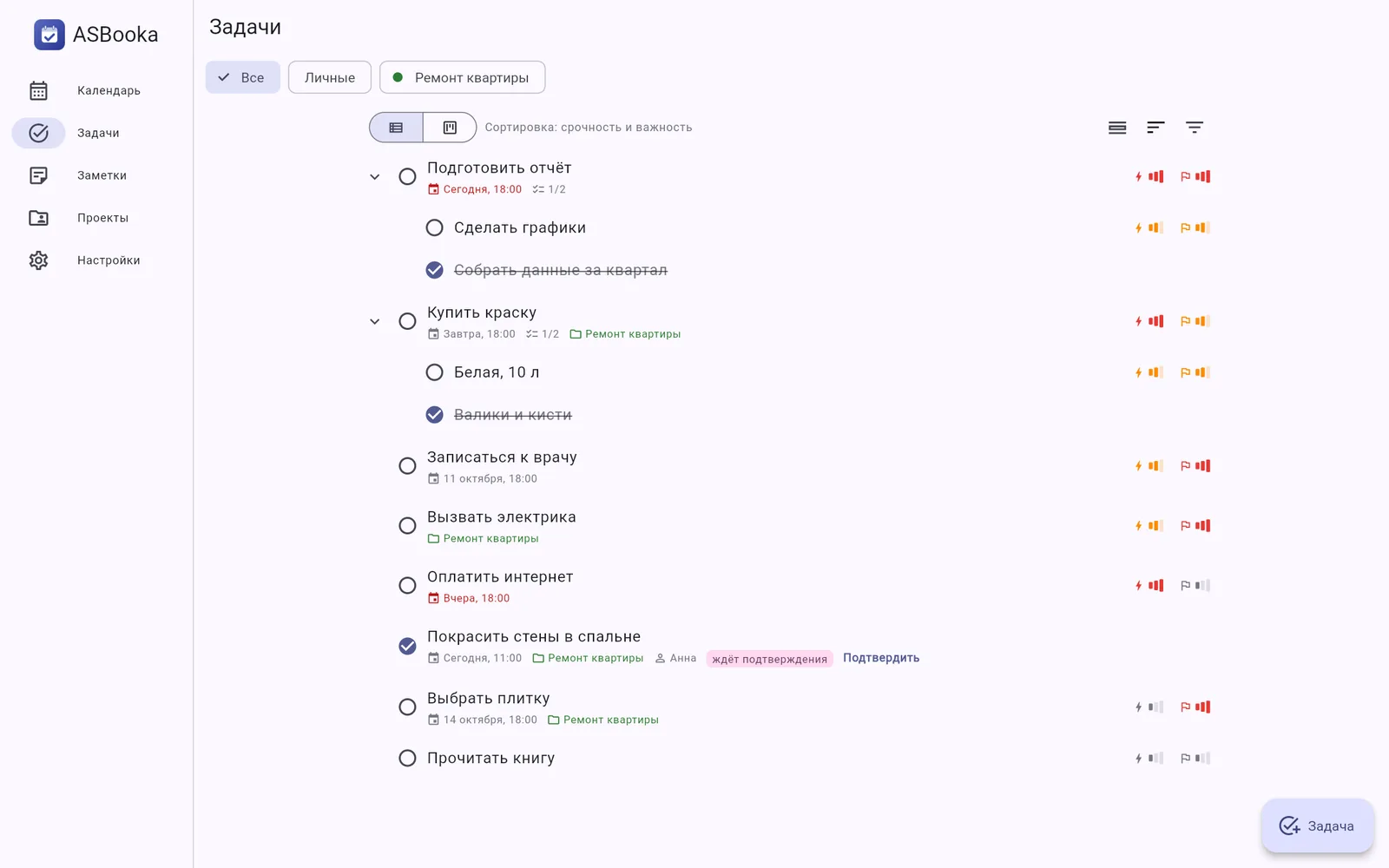
Tasks: list, board and Eisenhower matrix
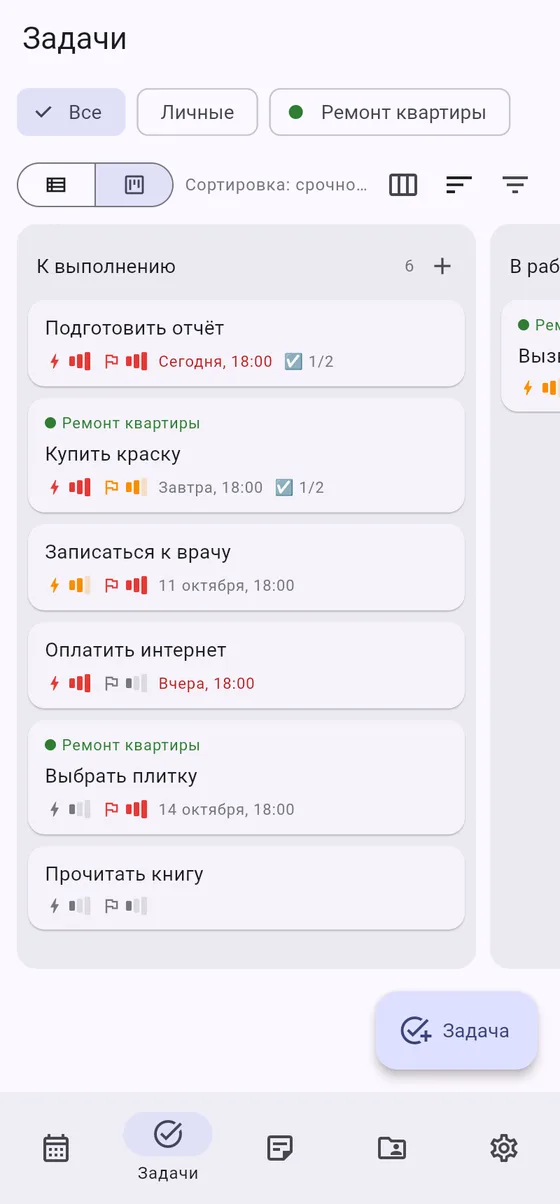
- Every task has urgency and importance, and the Eisenhower matrix sorts your to-dos into four quadrants — drag tasks between them.
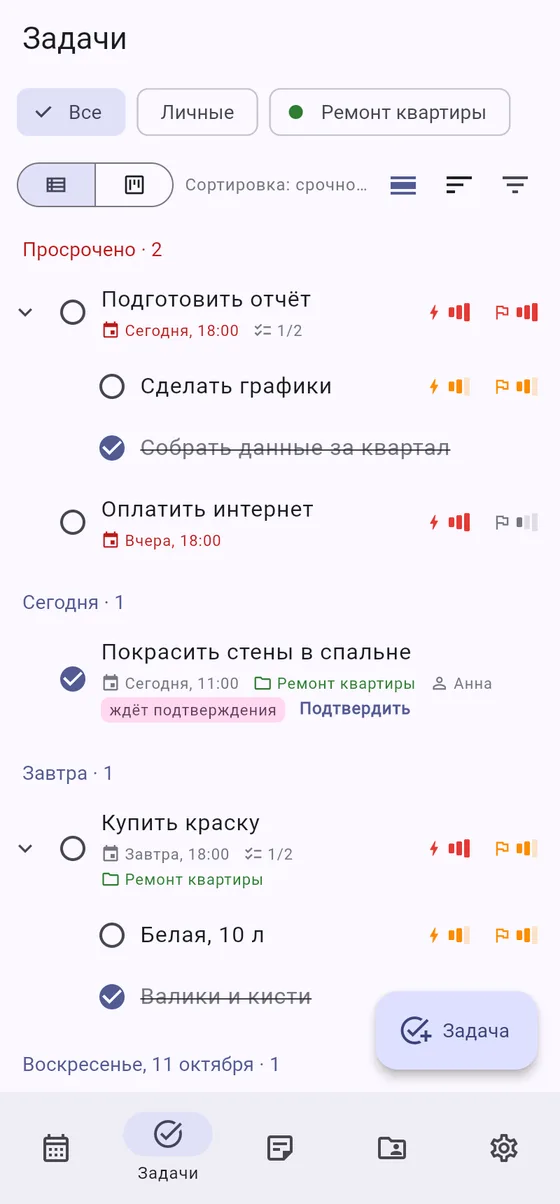
- Subtasks, recurrence, due dates and reminders.
- A Board view with your own columns: drag tasks from stage to stage.
- Group the list by day: today, tomorrow, this week.
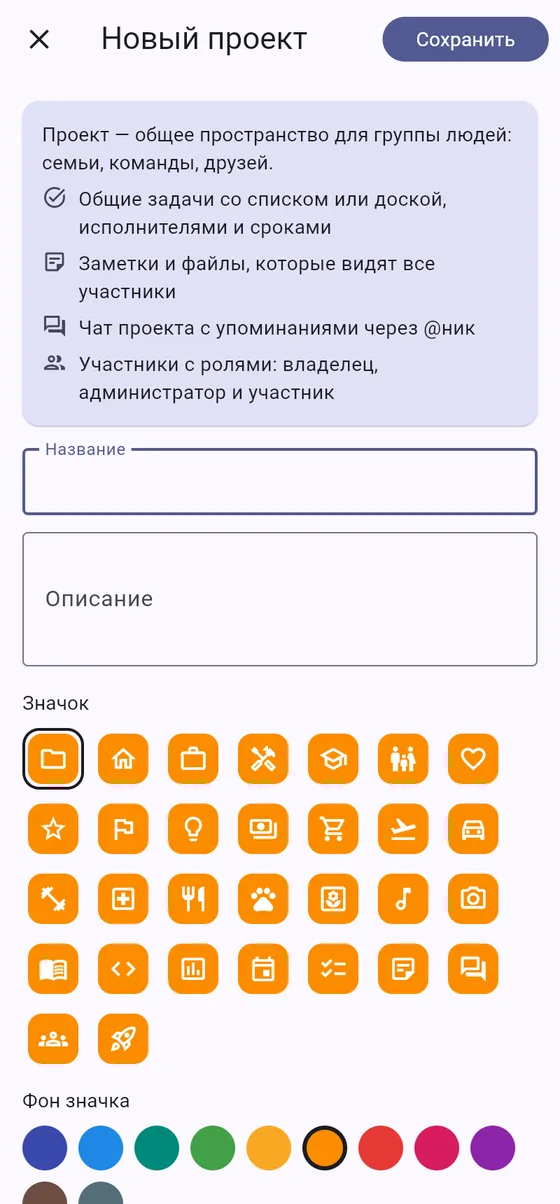
Shared projects for families and teams
- Each project has its own tasks, notes, calendar and chat: everything in one place.
- Invite people with a link or a code: they join in a couple of taps.
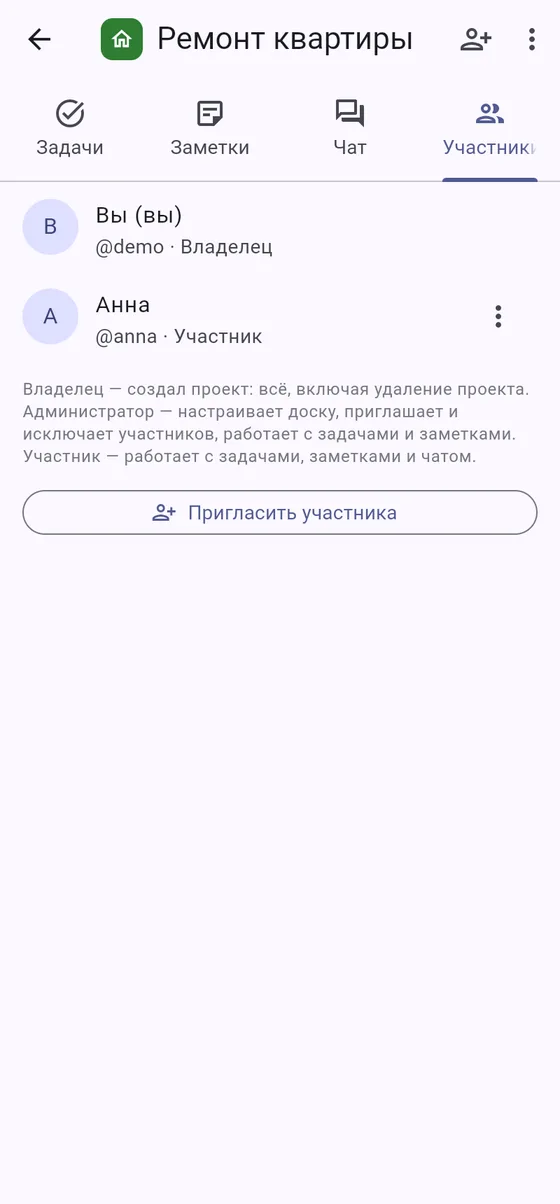
- Roles: owner, admin, member and viewer — a viewer sees the project and writes in the chat but can't change anything.
- A project board set up by the owner and admins.
- Joining other people's projects is free on any plan.
Notes with formatting
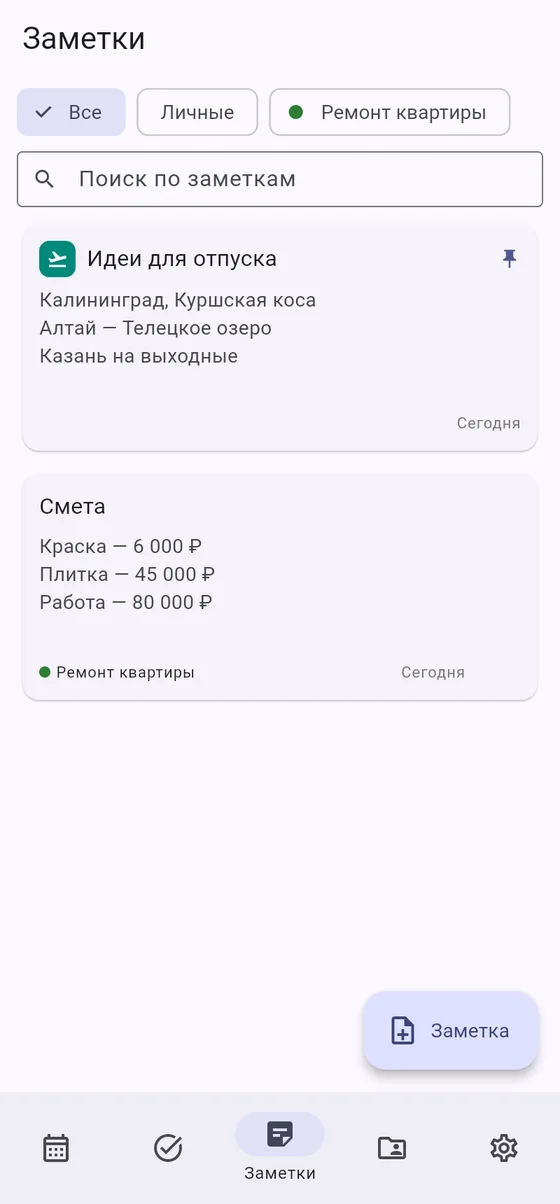
- Bold and italics, headings, lists and tables.
- Personal notes and project notes right next to its tasks.
- Icons and colors so you can spot the right note at a glance.
- Files and photos in notes on paid plans.
Tasks with sign-off
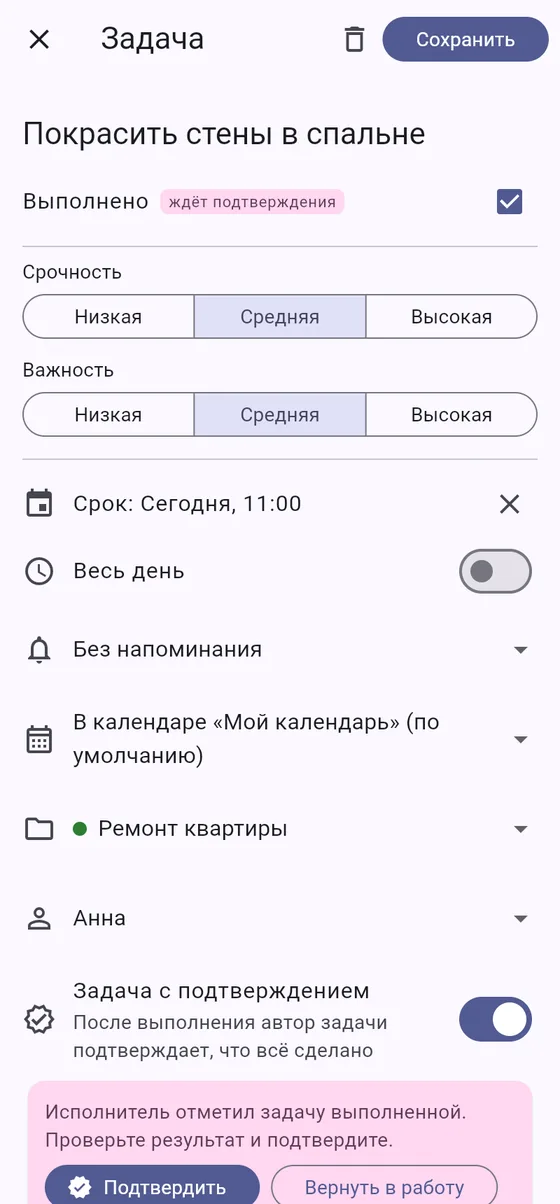
- Assign a task and mark it "requires sign-off".
- The assignee completes it and attaches photos or documents as proof.
- You get a notification and either approve the work or send it back.
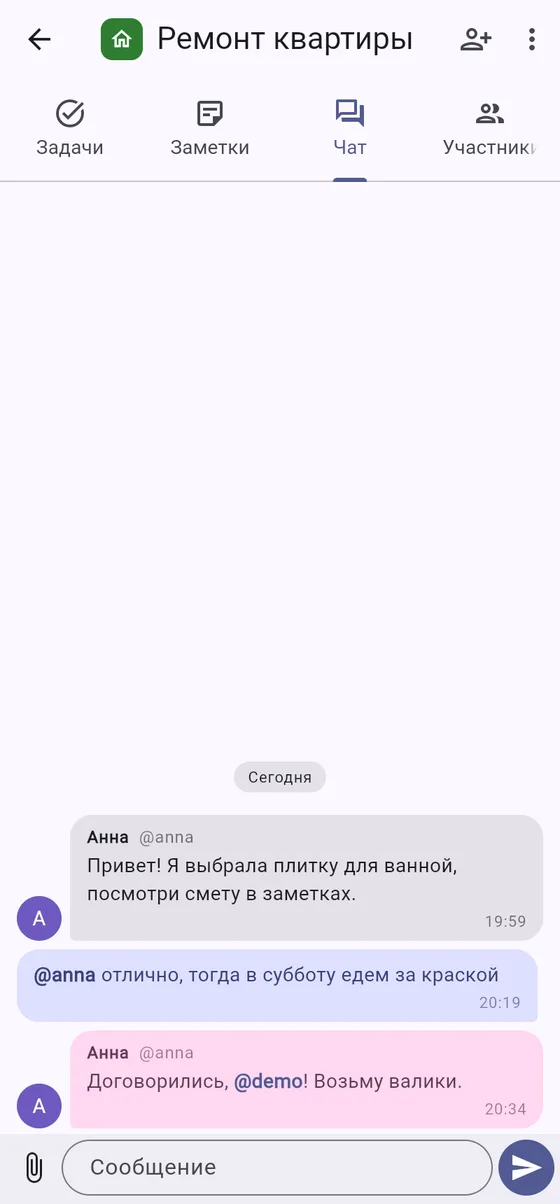
A chat in every project
- Discuss things right where the tasks and notes are.
- Mention people with @ and they get a notification.
- Photos and files right in the conversation.
One app instead of four
Your calendar, to-do list, notes and work chat usually live in separate services. In ASBooka they are connected.
Works with your calendars
Yandex, Apple and Google: no need to move your events — connect your calendars and they appear in ASBooka next to your tasks.
Data stored in Russia
Our servers are located in Russia, and personal data is processed under Federal Law No. 152-FZ. Sign in with Yandex ID — no new passwords.
Together with family and team
A shared project brings tasks, notes, a calendar and chat together. Members work on it, viewers keep an eye on progress. Joining other people's projects is free on any plan.
Keep track of assignments
Tasks with sign-off and result files: you see what has been done and accept the work in one click.
On any device, even offline
The web version works without a connection: your changes are saved and sent once you're back online. There is an app for Windows; apps for Mac and Android (on RuStore) are coming soon. Your theme, views and board columns stay the same on every device.
Priced in rubles
A free plan for personal use. Paid plans start at 349 ₽ a month, payable by card or via SBP (Faster Payments System).
How ASBooka is different
| ASBooka | Standalone calendar | To-do list | Team task tracker | |
|---|---|---|---|---|
| Calendar with Yandex, Apple and Google | ✓ | ✓ | — | — |
| Tasks with due dates in the calendar | ✓ | — | ✓ | ✓ |
| Notes next to tasks | ✓ | — | — | ✓ |
| Project chat | ✓ | — | — | often missing |
| Board and member roles | ✓ | — | — | ✓ |
| Eisenhower matrix | ✓ | — | rarely | rarely |
| Sign-off on completion | ✓ | — | — | on pricey plans |
| Suits family and personal use | ✓ | ✓ | ✓ | too complex |
| Data stored in Russia | ✓ | not always | not always | not always |
See it in action
Start for free
Calendar, tasks, notes, the Eisenhower matrix and project chat are on every plan. A paid plan lifts the limits on to-dos and gives you more projects, members, calendars and space for files. Joining other people's projects is free on any plan.
Try the Team plan free for 14 days. No card required, once per account. Afterwards your account moves to Start and all your data is kept.
Start
For personal to-dos and getting to know the app
- Up to 25 active tasks and 20 notes
- 1 project of your own, up to 2 members
- 1 connected calendar
- Storage 200 MB, no file attachments
- Project chat, 3 months of history
- Help center in the app
Personal
For one person: unlimited tasks and notes
- Unlimited tasks and notes
- 3 projects of your own, up to 4 members each
- 3 connected calendars
- Files up to 20 MB, storage 1 GB
- Project chat, 1 year of history
- Data export to a file
- Email support
Team
For families and small teams with shared projects
- Unlimited tasks and notes
- Unlimited projects, up to 10 members each
- Roles: project admins and viewers
- Unlimited connected calendars
- Files up to 100 MB, storage 10 GB
- Project chat, full history
- Data export to a file
- Support reply within 1 business day
Business
For companies of 5+ people with a single bill
- Unlimited tasks and notes
- Unlimited projects and members
- Roles: project admins and viewers
- Unlimited connected calendars
- Files up to 100 MB, storage 20 GB + 5 GB per member
- Project chat, full history
- Data export to a file
- Priority support
Compare plans in detail
| Start | Personal | Team | Business | |
|---|---|---|---|---|
| Monthly price | free | 349 ₽ | 699 ₽ | 249 ₽ per member, from 5 members |
| Yearly price | free | 3,490 ₽ | 6,990 ₽ | 2,490 ₽ per member |
| Active tasks | up to 25 | unlimited | unlimited | unlimited |
| Notes | up to 20 | unlimited | unlimited | unlimited |
| Your own projects | 1 | 3 | unlimited | unlimited |
| Members per project | up to 2 | up to 4 | up to 10 | unlimited |
| Member roles | — | — | admins and viewers | admins and viewers |
| Connected calendars | 1 | 3 | unlimited | unlimited |
| File in a task or note | — | up to 20 MB | up to 100 MB | up to 100 MB |
| Storage | 200 MB | 1 GB | 10 GB | 20 GB + 5 GB per member |
| Project chat history | 3 months | 1 year | full | full |
| Data export | no | yes | yes | yes |
| Support | help center | email, reply within 1 business day | priority |
You pay for a plan in the app: Settings → Plan. Payment is by card or via SBP through Robokassa, and the receipt is sent to your email. You can cancel your subscription at any time; within 5 days of payment we refund the full amount, after that no refund is provided. By paying, you accept the public offer and the refund terms. Pricing details.
For large teams and companies, we are open to custom plans: pricing, limits and payment method. Write to asbworlds@ya.ru.
ASBooka on your computer and phone
Windows
An app for Windows 10 and 11. Installs without administrator rights and appears in the Start menu.
Download for WindowsPhone
Open app.asbooka.ru in your phone’s browser and add it to the Home Screen: it opens full screen and sends reminders.
Mac and Android — coming soon
An app for Mac and an Android app on RuStore are on the way. Until then, the web version works there, even offline.
If Windows shows “Windows protected your PC” on first launch, click “More info” → “Run anyway”.
Frequently asked questions
How do I get started?
Open app.asbooka.ru and sign in with Yandex ID. Your account is created automatically on the free Start plan.
Can I try a paid plan?
Yes. The Team plan is free for 14 days, no card required. The trial is available once per account. After it ends, your account moves to Start, and your tasks, notes and files are kept.
How do I install it on my computer and phone?
There is a separate app for Windows — download it here, and one for Mac is coming soon. On your phone, open app.asbooka.ru in the browser and add the page to your home screen: in Safari via Share, in Chrome via the menu. The app will open full screen and send you reminders; on iPhone, notifications work on iOS 16.4 and later. An Android app is coming soon to RuStore.
Does ASBooka work offline?
Yes. The web version opens without a connection: your tasks, notes and calendar stay at hand, and changes are sent to the server as soon as you're back online.
Can I connect a Yandex, Apple or Google calendar?
Yes. Connect your calendars in the settings and events sync both ways. How many calendars you can connect depends on your plan. Inside ASBooka, tasks are shown in the color of the calendar you choose.
Where is my data stored?
On servers in Russia. Your tasks, notes and files belong to you, and you can delete your account together with all its data at any time.
How much does it cost to invite family or colleagues?
Joining other people's projects is free on any plan. Limits on the number of projects and members apply to the project owner. You can invite people with a link or a code.
What's the difference between a member and a viewer?
The owner and admins invite people and set up the project, members work with tasks, notes and chat, and viewers can only look and write in the chat. Admins and viewers can be assigned on the Team and Business plans.
What happens to my data if I don't renew my subscription?
Nothing is deleted. Your account moves to the Start plan, and anything above its limits stays available to view.
Try ASBooka today
Signing in with Yandex ID takes a few seconds. The free plan has no time limit.
Open app